
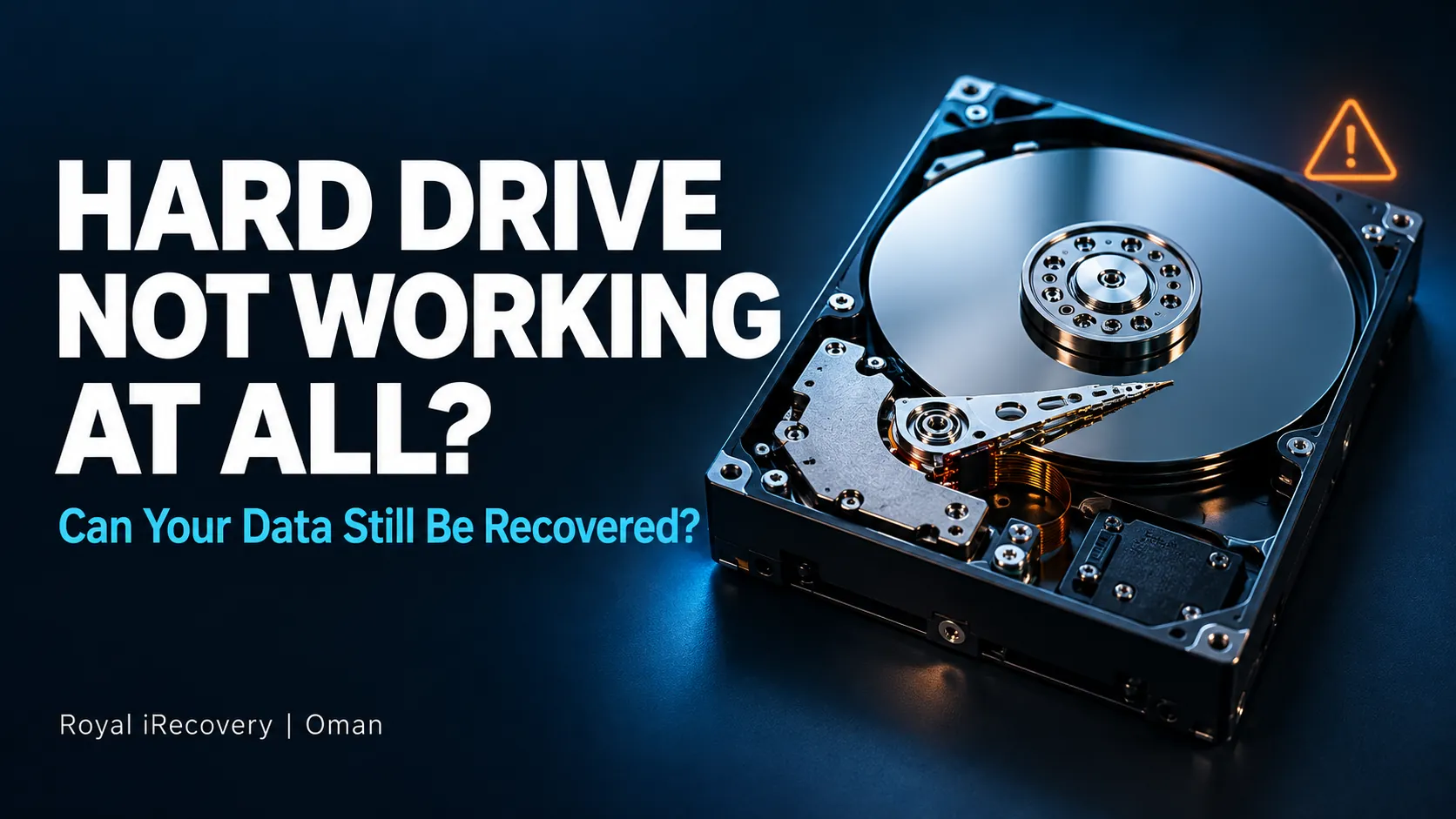
Your hard drive will not start, your computer cannot detect it, and you cannot access your files. Does that mean your data is gone? Not necessarily. A failed drive can still contain recoverable photos, documents, and business files.
A hard drive that won’t spin may have a power issue, damaged electronics, or an internal mechanical fault. The symptoms can look similar, but the recovery approach depends on the cause. The first priority is to protect the data from further damage.
If your files are important, keep the drive powered off. Avoid repeated startup attempts, formatting prompts, and repair experiments. At Royal iRecovery in Oman, we start with a free diagnosis to identify the fault and assess your recovery options before you decide how to proceed.
Why Is Your Hard Drive Not Working at All?
A hard drive needs a working power connection, functioning electronics, and readable internal components. A failure anywhere in that chain can leave it completely inaccessible.
For an external HDD, the fault may sit outside the drive itself. A damaged USB cable, faulty power adapter, or failed enclosure can prevent an otherwise recoverable drive from communicating with your computer. Internal drives can also disappear because of connection problems. Seagate identifies damaged cables and incorrect connections among possible causes of drive non-detection.
Other cases involve damage within the HDD. A power incident, accidental drop, or worn mechanical component may stop it from starting correctly.
Symptoms help guide the assessment, but they don’t provide a reliable diagnosis on their own. A drive that stopped working after a fall needs a different approach from one that disappeared after a cable change.
Hard Drive Not Spinning: What Could Be Wrong?
If your hard drive isn’t spinning, its platters aren’t reaching the rotation needed for normal operation. Possible causes range from insufficient power to an internal mechanical fault.
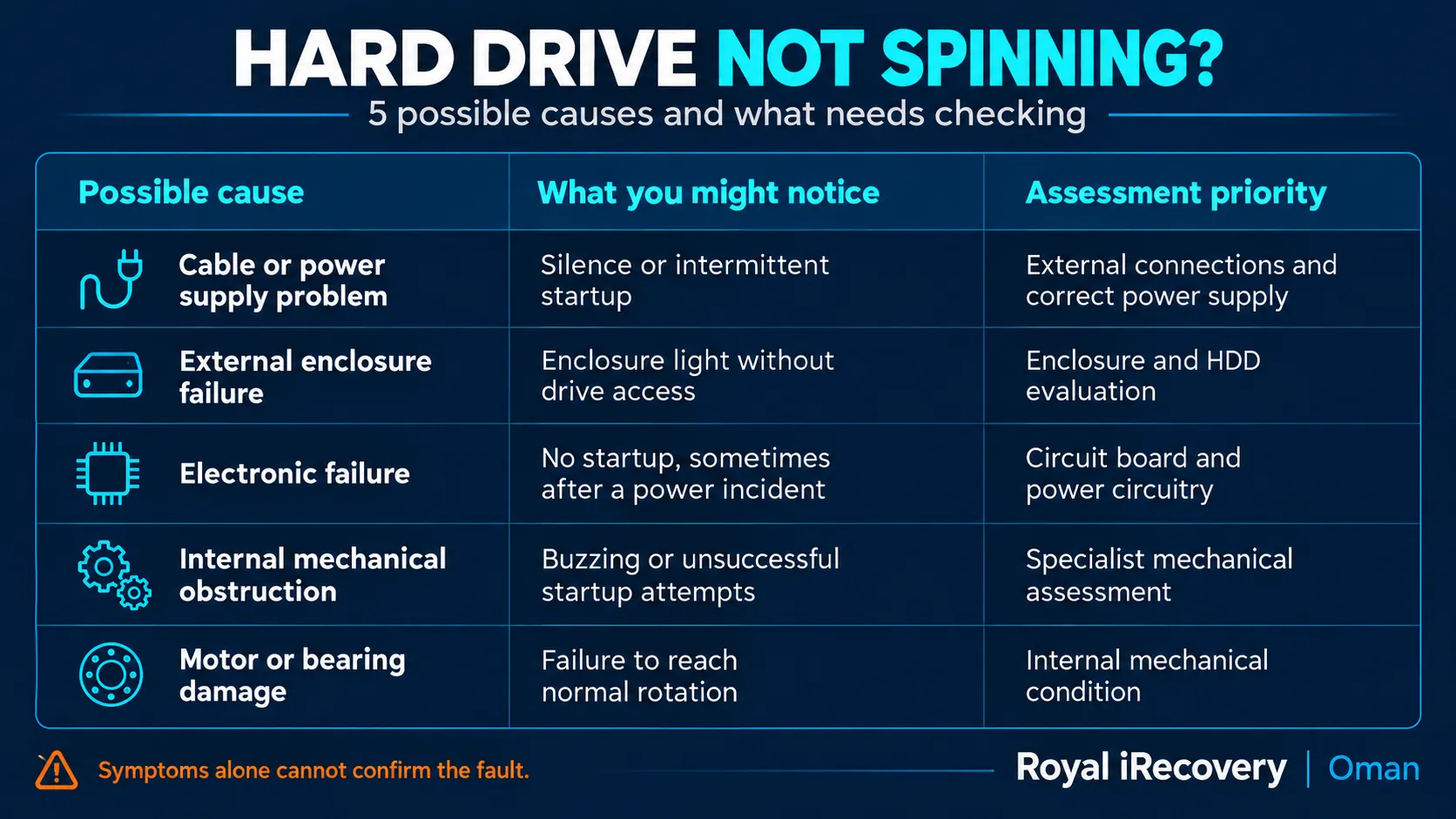
An illuminated enclosure light doesn’t prove the HDD is working. Likewise, silence alone cannot tell you which component failed.
Seagate advises powering down immediately if a drive produces grinding sounds, because further operation can make recovery more difficult or impossible.
Hard Drive Not Showing Up: Is It Really Dead?
A hard drive missing from File Explorer or Finder is not necessarily physically dead. A missing volume is different from a drive the computer cannot detect at all.
For example, Windows may detect a physical disk even when it cannot display its files. Seagate’s troubleshooting guidance distinguishes drive-letter problems from RAW or unallocated disks, which may require data recovery when you need the files.
The useful questions are:
- Visibility in Disk Management or Disk Utility
- Correct model name and storage capacity
- Stable detection without disconnections
- Unusual sounds or recent physical damage
You can note information already visible on screen. However, don’t initialize, format, or create a new partition just to make the drive appear. Those actions change the disk rather than recover its existing files.
What Should You Do First When a Hard Drive Stops Working?
Start with the value of the files. If they are irreplaceable and you have no backup, keep the drive powered off as the safest next step.
For a quiet external drive with no recent impact, burning smell, or abnormal sound, a limited connection check may help identify an external problem:
- Known-good compatible USB cable
- Direct computer connection
- Correct original power adapter
- One alternative USB port
Avoid random replacement adapters. A matching connector does not establish electrical compatibility.
If the drive remains inaccessible, stop troubleshooting and record what happened: the last successful use, any fall or power interruption, and the symptoms you noticed. These details give the technician a better starting point.
What Should You Avoid Doing to a Dead Hard Drive?
The wrong move can turn a recoverable failure into a harder case.
Common mistakes include:
- Repeated power cycling
- Freezer experiments
- Tapping or shaking
- Opening the sealed HDD cover
- Unverified circuit board swaps
- Formatting or initialization
- Repair commands on the original disk
- Long scans despite abnormal sounds
A replacement circuit board is not automatically a working solution. Drive-specific information may need to be preserved or transferred by a specialist.
Opening the sealed drive is another major risk. Internal mechanical work requires suitable contamination control and specialist handling.
Can Data Recovery Software Detect a Dead Hard Drive?
Software cannot recover files from hardware it cannot access. It cannot supply missing power, free a seized motor, or repair damaged read/write heads.
Recovery software may help when a drive remains readable, and the problem involves deleted files, damaged partitions, or file system corruption. Even then, an unstable drive needs assessment before a lengthy scan.
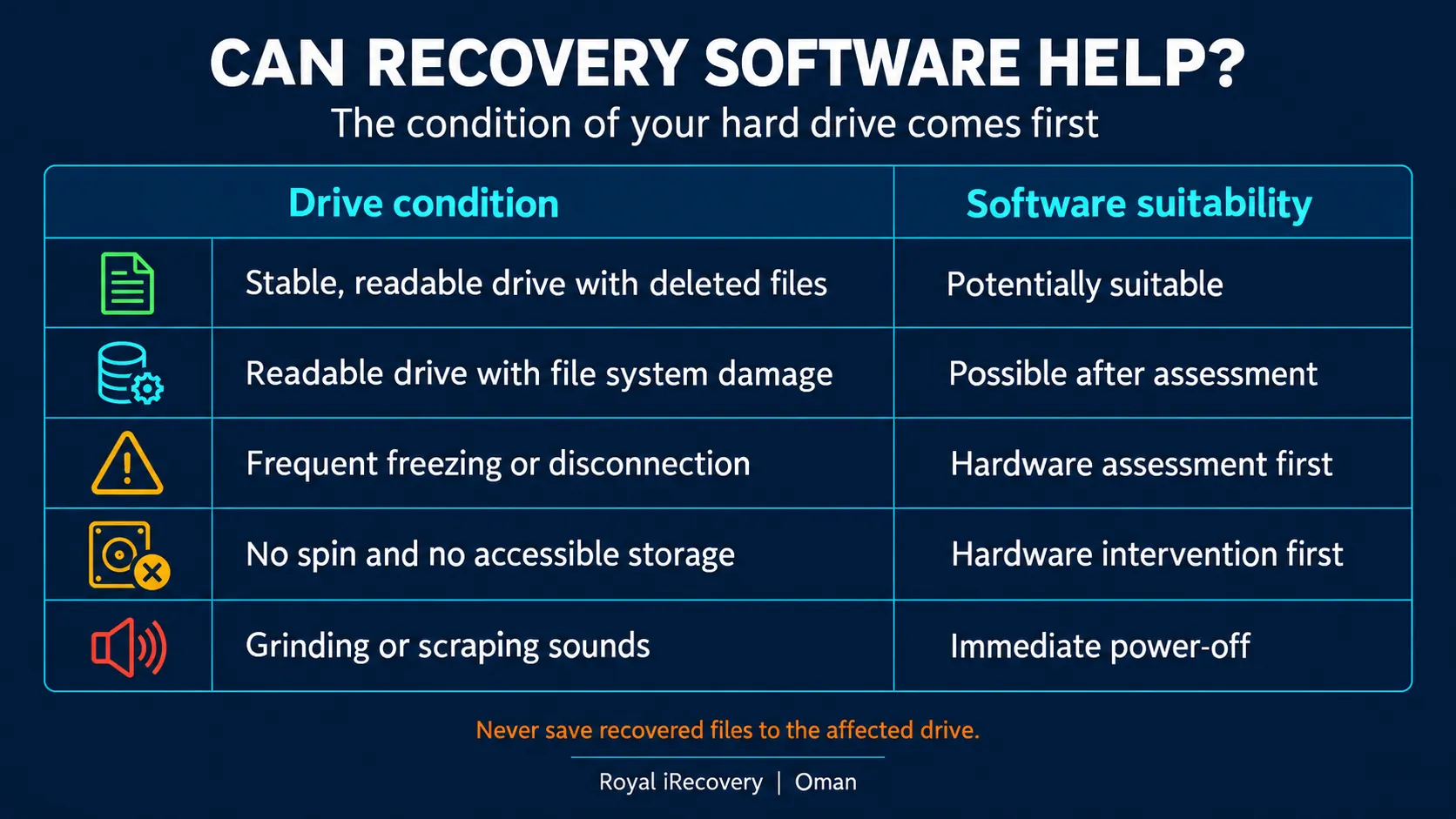
Never install recovery software onto the affected drive or save recovered files back to it. Where the source is failing, a specialist may first create an image and recover files from that copy.
How Does Professional Dead Hard Drive Data Recovery Work?
Professional recovery begins with diagnosis. The technician identifies what prevents access and determines whether the drive can be read safely.
Depending on the fault, the process may involve electronic work, firmware intervention, or internal mechanical work. The goal is to gain controlled access to retrieve the data.
In many cases, recovering the data starts with dealing with the fault that stopped the drive. Our hard drive repair services in Muscat cover failed circuit boards, firmware corruption, and damaged read/write heads, restoring stable access long enough to copy your files safely.
The usual stages include:
- Initial assessment: failure symptoms and device condition.
- Recovery plan: proposed work, limitations, and estimated cost.
- Controlled access: appropriate intervention for the diagnosed fault.
- Data imaging: copying readable sectors where possible.
- File recovery: reconstruction and checks of recovered content.
- Data delivery: transfer to separate storage.
At Royal iRecovery, we offer a free initial diagnosis and a cost estimate before we begin recovery work. Our published service process includes specialist equipment such as PC-3000 and Class 100 cleanroom facilities for cases requiring internal intervention. The method depends on the fault; we don’t open every drive.
What Affects the Chances of Recovering Your Files?
The main factor is whether the areas containing your data remain readable.
A failed electronic component may leave recorded data intact. Serious platter damage can directly affect the information stored on the damaged surface. Encryption can also limit recovery if you don’t have the necessary keys or passwords.
Important factors include:
- Failure type and severity
- Platter surface condition
- Read/write head condition
- Duration of continued operation
- Previous repair attempts
- Encryption and key availability
- Location of priority files
A drive that failed yesterday is not automatically easier to recover than one that failed months ago. What happened during and after the failure matters more than the calendar.
No responsible assessment should promise complete recovery before examining the drive. Some cases allow full recovery, others partial recovery, and some remain unrecoverable.
How Much Does Dead Hard Drive Data Recovery Cost?
The cost depends on the fault and the work required to access the data. Storage capacity alone does not determine the price. An external connection problem and an internal mechanical failure can produce similar symptoms while requiring very different recovery procedures.
Typical cost factors include:
- Diagnostic findings
- Electronic or mechanical intervention
- Compatible donor parts
- Imaging complexity
- Media damage
- Required delivery storage
At Royal iRecovery in Oman, the initial diagnosis is free, followed by a report and cost estimate. This gives you a basis for deciding whether to proceed. Before approving recovery, ask what the quote includes, how partial recovery is handled, and what charges apply if the priority files cannot be recovered.
When Should You Contact a Data Recovery Specialist?
Contact a specialist promptly when the drive contains important files without a backup, particularly after physical damage or signs of mechanical failure.
Strong reasons for assessment include:
- Clicking, grinding, or scraping
- No startup after a power incident
- Failure following a drop
- Repeated disconnections
- Incorrect capacity detection
- Persistent non-detection
- Previous unsuccessful repair attempts
You do not need to exhaust every DIY method first. When the files are valuable, early assessment can avoid unnecessary handling.
Hard drive not working at all? Leave it powered off and contact Royal iRecovery for a free initial diagnosis.
Our Oman branch is at Al Khuwair Street, Al-UZD Complex, Shop No. 5. Call +968 77 480 955 or use our contact page to explain the symptoms and arrange an assessment. If you are outside Muscat, contact the team before sending your drive.
Frequently Asked Questions About Dead Hard Drives
Can you recover data from a hard drive that will not turn on?
Sometimes, yes. A failure that prevents startup does not necessarily destroy the recorded data. Recovery depends on the failed components and the condition of the storage surfaces.
Does a hard drive not spinning mean the motor is broken?
No. Power delivery, electronics, or an internal obstruction may also prevent rotation. The symptom needs diagnosis before the motor can be blamed.
Why is my external hard drive light on but the drive is not working?
The light may indicate power to the enclosure while the HDD remains inaccessible. Possible causes include connection, enclosure, electronic, or mechanical problems.
Should I format a hard drive that Windows cannot open?
No, if you need its existing files. Formatting is not a recovery method and can complicate later recovery.
Can I recover files by replacing the circuit board?
A board swap alone may not work because it may require compatible electronics and drive-specific information. Unverified replacement attempts can introduce further problems.
Is a recovered hard drive safe to use again?
Recovering files does not establish long-term reliability. Transfer the recovered data to dependable storage and replace the drive with one with confirmed hardware failure.