
Your server is offline, shared folders have disappeared, and your team needs its files back. Searching for RAID recovery software can feel like the fastest way forward. But before you download a tool or click “rebuild,” one question matters more than the software name: what actually failed?
RAID recovery software can help reconstruct an array and retrieve files when enough of the original data remains readable. It cannot repair a damaged read/write head, recreate overwritten information, or make every failed array recoverable. If you use it on the wrong source, or alongside repair operations that write to the disks, a recovery attempt can make things worse.
This guide explains when software makes sense, what free tools really provide, and when a business in Oman should arrange a professional assessment before making further changes.
Can RAID Recovery Software Recover Your Data? A Quick Assessment
The answer depends on the failure, the RAID layout, the condition of its member disks, and what happened after access was lost. An inaccessible array does not automatically mean the drives are physically damaged. Equally, a drive appearing in software does not prove that it is healthy.
What Should You Do Before Downloading RAID Recovery Software?
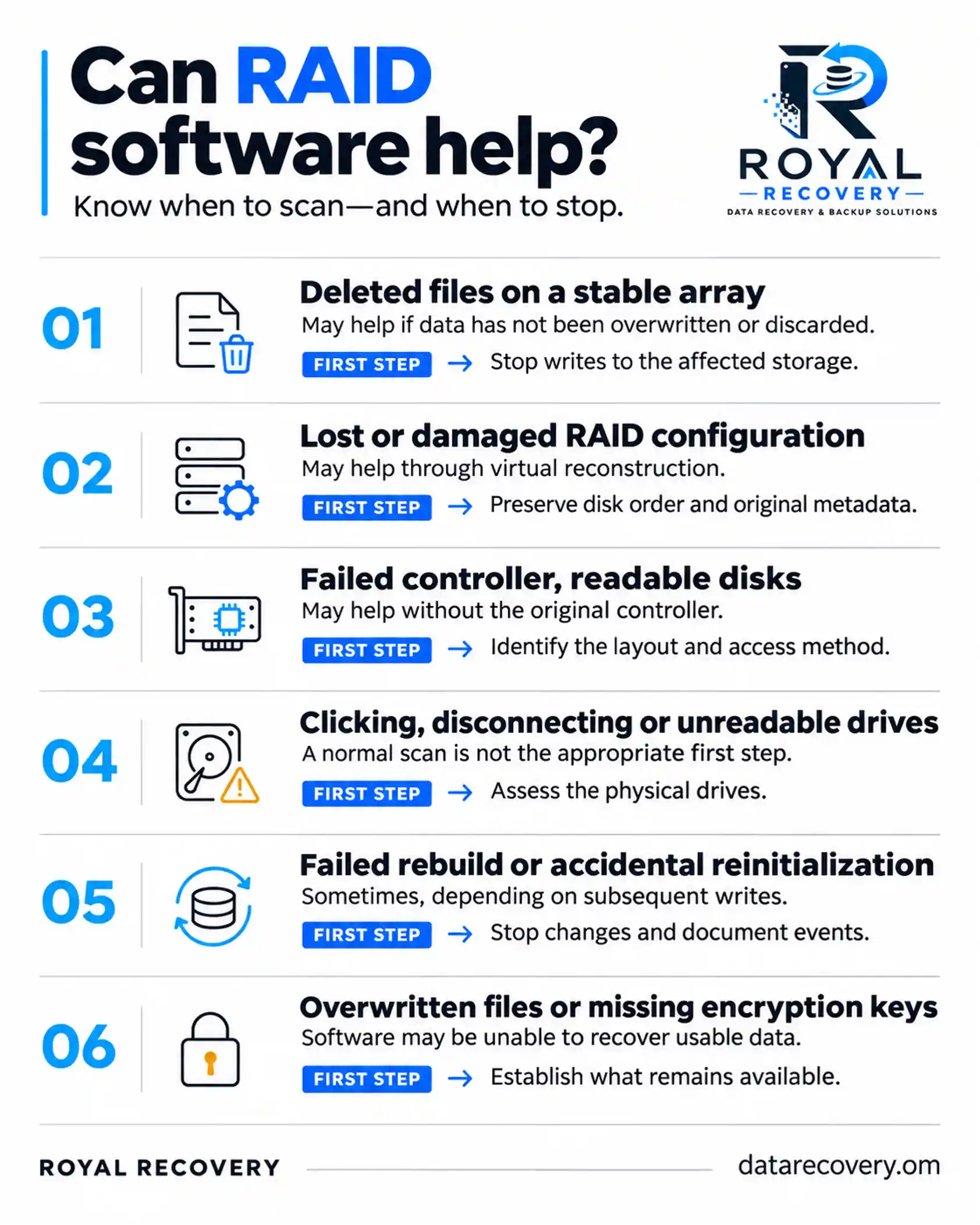
First, prevent further changes to the affected storage. Stop applications, backup jobs, and other activity that writes to the array. If disks make unusual noises or repeatedly disappear, stop and seek specialist guidance.
Record the server or NAS model, controller details, error messages, and the sequence of events. Photograph drive positions and record serial numbers before removing anything. Bay position and disk identity matter when reconstructing the array.
Avoid these actions while the cause remains uncertain:
- Initializing or formatting member disks
- Creating a replacement array on the original disks
- Forcing disks online or starting a speculative rebuild
- Running CHKDSK, fsck, or other repair tools against the affected source
- Installing recovery software on the affected volume
- Saving recovered files back to the original array
These are different operations, but each can change evidence needed for recovery. A prompt asking you to initialize an unreadable disk is not a recovery instruction.
When Does RAID Recovery Software Help?
Software is most useful when the available drives can be read reliably, and the problem involves the logical organization of data.
For example, a controller may stop presenting the array even though its disks remain readable. A suitable tool may virtually reconstruct the storage layout, then examine its file system. In another case, an employee may delete a shared folder from a functioning NAS. Recovery then depends on the remaining file system records and file contents, as well as snapshots or backups that may already offer a better restoration route.
Typical software recovery candidates include deleted files, some formatted volumes, missing partitions, and certain damaged RAID configurations. Each requires different analysis. Finding a recognizable volume is only an intermediate step; you still need to check recovered files.
For a business, that means opening representative documents and validating critical databases or virtual machines in an isolated environment before treating the recovery as complete.
When Can RAID Recovery Attempts Make Data Loss Worse?
A reputable tool that reads a stable disk image does not inherently destroy the source data. The danger comes from what the recovery workflow does to the original storage.
Writing to the source can overwrite recoverable information
Installing software on the affected volume, exporting files to it, or running repair operations can replace information the recovery process needs. On SSD-based storage, TRIM or discard behavior can further limit deleted-data recovery.
Repeated scans can stress failing disks
A drive with unstable reads may deteriorate during prolonged access. Running several tools in succession can mean repeatedly reading the same damaged areas without preserving a usable copy. Imaging an unstable drive also requires care; a standard cloning utility is not always the right approach.
Incorrect reconstruction can produce misleading results
The wrong disk order, stripe size, parity layout, or offsets can produce a folder tree with damaged files. A plausible file name is not proof of correct recovery. If you then write incorrect settings to the original disks, the consequences can be more serious.
The practical rule is to preserve the original state and, wherever feasible, perform reconstruction on suitable images. UFS Explorer’s recovery guidance specifically warns against writing to the source, inappropriate rebuilds, and continuing to operate degraded storage.
RAID Recovery vs. RAID Rebuild: What Is the Difference?
A RAID rebuild normally restores redundancy by reconstructing a replacement member from surviving disks. It is a storage maintenance operation that writes data and places a substantial reading workload on the remaining members.
RAID data recovery aims to extract lost or inaccessible information. Recovery software can assemble a virtual representation of an array without rebuilding the original storage in place.
A rebuild can be appropriate after diagnosing a failure, provided you have suitable protection in place. It shouldn’t be the default option when the array’s state is unknown, and the data is already inaccessible.
Which RAID Recovery Software Fits Your Array and File System?
Choose a tool based on your storage and the failure you need to address. A “best RAID recovery software” list can’t tell you whether your drives are safe to scan.
Check the following before purchasing:
- Support for the RAID level and any nested or proprietary layout
- Support for the source file system and storage layers
- Compatibility with the computer used for recovery
- Ability to open the disk images you intend to use
- Automatic detection and manual configuration options
- Preview and export restrictions in the trial version
- Licensing terms for business or third-party recovery work
Also consider the person using it. A tool with advanced manual controls is useful only when the operator can identify and validate the correct parameters.
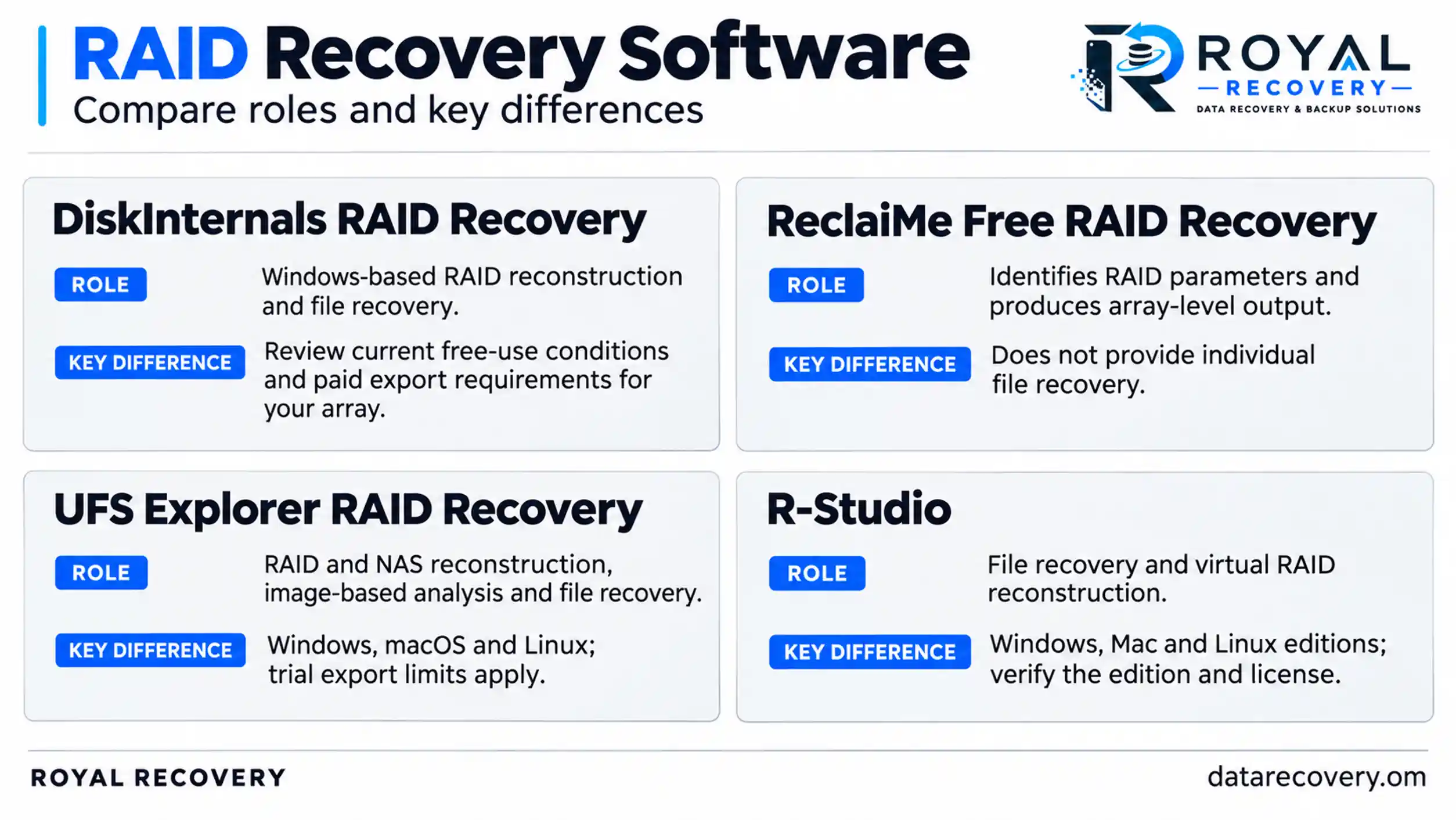
DiskInternals, ReclaiMe, UFS Explorer and R-Studio: What Should You Compare?
These tools address overlapping needs, but their names and free-download offers do not describe identical functionality. The comparison below reflects published vendor capabilities, rather than a hands-on performance ranking.
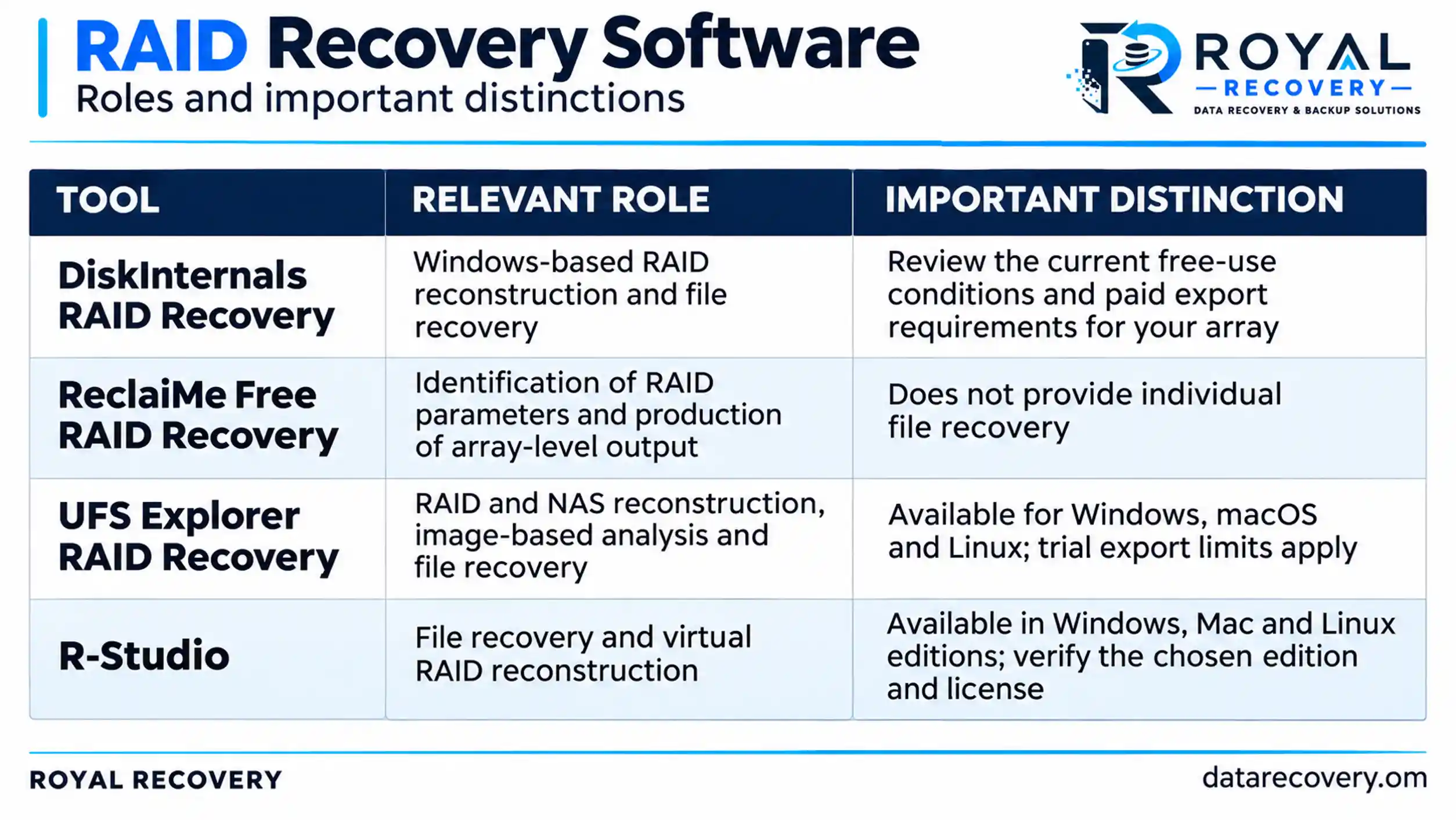
DiskInternals provides a free preview and currently advertises additional free-use conditions for some arrays. UFS Explorer offers trial reconstruction and a preview, with limited file export. Check the official download and licensing pages before relying on a particular allowance, because product terms can change.
Download from the developer’s official website. For confidential company data, the executable’s authenticity matters as much as its advertised features.
Is Free RAID Recovery Software Really Free?
“Free download” can mean free installation, free scanning, free preview, limited file export, or a genuinely free utility. These offers solve different parts of the problem.
ReclaiMe Free RAID Recovery, for example, identifies parameters such as disk order, block size, and start offset. Its official documentation says it doesn’t recover individual files. You may need separate storage for an array copy or another recovery program to extract selected files.
Budget for more than a software license. Images of the member disks and an independent destination for recovered data can require substantial storage. A free utility may still help, but it doesn’t remove those requirements.
Open-source software is another category, but it doesn’t guarantee automatic or risk-free recovery. Before using it, check whether a utility reconstructs your RAID layout, extracts files, or writes repairs to a source device.
What about cracked RAID recovery software?
A modified installer may introduce malware or unverified behavior into a recovery workstation. For a company handling customer records, financial files, or internal databases, that adds a confidentiality risk to an existing storage incident.
Use an official trial to assess suitability. Don’t include untrusted software in a business recovery process just to avoid a license fee.
RAID Recovery Software for Windows, Linux and Mac: What Must Be Compatible?
The operating system running the recovery program and the file system being recovered are separate compatibility questions.
A Windows-based tool may support files from a Linux-based NAS. That doesn’t mean it supports every NAS layout, or that Windows should initialize disks when you connect them.
If you are looking for RAID recovery software for Windows 10, confirm the current system requirements for the exact product version. Then check RAID support, file system support, hardware connectivity, and any additional storage layers separately. The same checks apply to recovery workstations running Linux or macOS.
Can Software Recover RAID 0, RAID 1, RAID 5, RAID 6 and RAID 10?
RAID level influences what information may remain after a member fails. It does not determine recoverability on its own.
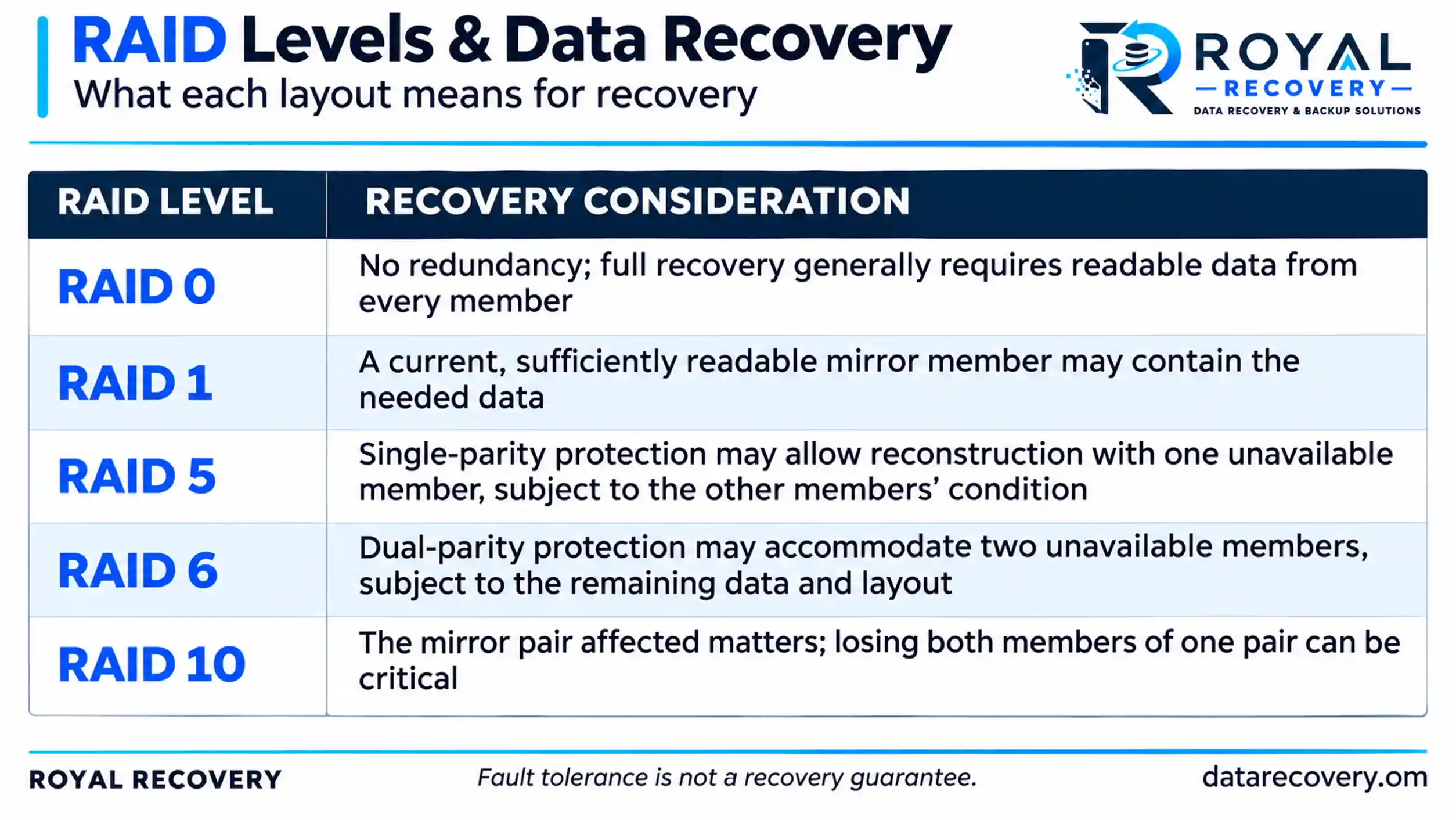
Nominal fault tolerance is not a guarantee of recovery. Stale members, unreadable sectors, interrupted writes, and earlier rebuild attempts can change the outcome. Preserve all available disks, including members the controller has marked as failed.
Can RAID Recovery Software Recover NAS, Server and Virtual Machine Data?
Potentially, but several layers may sit between the physical disks and the files the business needs.
A NAS can combine RAID, partitions, logical volumes, encryption, and a file system. A virtualization server may add a datastore, virtual disk files, and guest file systems. Recovering the outer storage layer does not automatically produce a working virtual machine or a consistent database.
For QNAP, Synology, and other NAS systems, check support for the actual configuration rather than the enclosure brand alone. For encrypted volumes, you may still need the correct credentials or keys after a successful reconstruction.
Business recovery should therefore validate the required result: shared folders, accounting files, database backups, virtual disks, or other application data.
What Does a Safer Software Recovery Process Involve?
A considered process starts with diagnosis and preservation, then moves to reconstruction and extraction.
- Document the incident. Record the configuration, errors, failed members, and previous actions.
- Assess source stability. Identify whether physical drive work is needed before software analysis.
- Preserve readable data. Create suitable images where feasible, using an approach appropriate to drive condition.
- Reconstruct virtually. Analyze copies and validate the proposed RAID parameters.
- Extract to separate storage. Keep recovered files away from original members and source images.
- Validate essential files. Check representative content and application-level usability before restoring production services.
When Should a Business in Oman Choose Professional RAID Recovery?
Arrange an assessment when disks are unstable, several members are affected, a rebuild has failed, the configuration is uncertain, or the array holds the only copy of essential information.
The decision should reflect the data’s value, downtime costs, and licensing costs. Several hours spent testing unsuitable tools can leave a business with the same outage and fewer recovery options.
For companies in Muscat and across Oman, Royal Recovery assesses data loss in servers, RAID, NAS, and virtual environments. The published service process includes an initial assessment and a recovery quotation before work begins. We can arrange an NDA when required.
If you manage IT for another company, provide the incident history and storage configuration when making the inquiry. This gives the assessment team a clearer starting point and helps your client understand the next decision.
Request a RAID Assessment in Oman: What Should Your IT Team Prepare?
Before another rebuild, repair, or scan, send the available details to the Royal Recovery team:
- Server or NAS brand and model
- RAID level and controller model, if known
- Disk count, capacities, and HDD, SSD, SATA, or SAS details
- Exact error messages and current array status
- Order of failures and any disk replacements
- Previous software scans, repairs, or rebuild attempts
- Backup availability and the most important files
- Confidentiality requirements and business deadlines
You do not need every technical detail to make an initial inquiry. Explain what happened and which data your business needs back. The team can then advise on assessing and handling the affected equipment.
Contact Royal Recovery for a RAID assessment in Oman before making further changes to your original disks. Visit the server data recovery service page or contact the team on WhatsApp.
Frequently Asked Questions About RAID Recovery Software
Can I recover RAID data without the original controller?
Sometimes. Software can reconstruct supported arrays from readable disks or images, but encryption and proprietary layouts may limit recovery.
Can software detect disk order and stripe size?
Some tools can, but you need to validate the settings they detect. Incorrect settings may produce files that will not open.
Can I recover data after a failed RAID rebuild?
Possibly, depending on how much original data survives. Stop further changes and preserve all member disks.
Why do recovered files fail to open?
File names may survive while their contents are missing, overwritten, or incorrectly reconstructed. Preview representative files to check recovery quality.
How much extra storage will I need?
Plan for disk images and a separate destination for recovered files. Use the member disks’ full capacities when estimating image storage.
How long does RAID recovery software take?
Scan time depends on capacity, disk condition, connection speed, and array complexity.
Should I run CHKDSK before RAID recovery?
Avoid running it on the original storage. It can alter metadata needed for recovery. Preserve the source first.
What if I have already tried several recovery tools?
Record the tools used, any changes made, and where you saved the files. Keep logs and share this history during assessment.