

Deleted CCTV footage can sometimes be recovered if the original video data remains on the storage device and has not been overwritten. The chances depend on how the footage was lost, the condition of the hard drive or memory card, and whether the system continued recording afterward.
A missing recording does not always mean someone deleted it. The problem may involve playback settings, damaged recording information, a failed hard drive, or automatic overwriting. Identifying what happened is the first step towards finding the right recovery option.
Whether you need footage from your home, a business premises, or an organizational security system, avoid formatting or resetting the device while the cause is unclear.
When Is Deleted CCTV Footage Still Recoverable?
Recovery may be possible when a recording has disappeared from the playback menu, but some or all of its video data remains on the drive. Depending on the recorder, deletion can remove the information used to locate a recording without immediately overwriting the video itself.
The main factors are:
- Recording activity: New footage written after the loss.
- Deletion method: Manual deletion, formatting, automatic expiry, or another process.
- Storage condition: A readable drive, an unstable drive, or physical damage.
- Recorder format: The system used to store and organize recordings.
- Available copies: Recordings saved outside the affected device.
No assessment should promise recovery based only on the word “deleted.” The recorder model, incident history, and storage condition all matter.
What to Do Immediately After CCTV Footage Goes Missing
The priority is to preserve the recordings that may still exist. Continuing normal recording can put remaining video at risk, but changes to a live business security system should be coordinated with the responsible security or IT team.
Take these precautions:
- Prompt preservation: Arrange appropriate steps to prevent further recording onto the affected storage.
- No formatting or initialization: Preserve the original drive and its contents.
- No factory reset: Retention of existing settings and system information.
- Incident notes: Required date, time, camera channels, and discovery time.
- Device details: Recorder brand, model, and displayed error messages.
- Existing exports: Separate copies of any clips already retrieved.
Do not change the recorder’s date or time to search for missing footage. Note any difference between the displayed clock and the actual time instead. CCTV retrieval guidance also recommends preserving native recordings and their playback information.
If the hard drive clicks, repeatedly disconnects, or prevents the recorder from starting normally, avoid repeated restart attempts and seek advice before scanning it.
Deleted, Overwritten or Not Recorded: Why the Difference Matters
These situations can look similar on the playback screen, but they have different recovery limits.
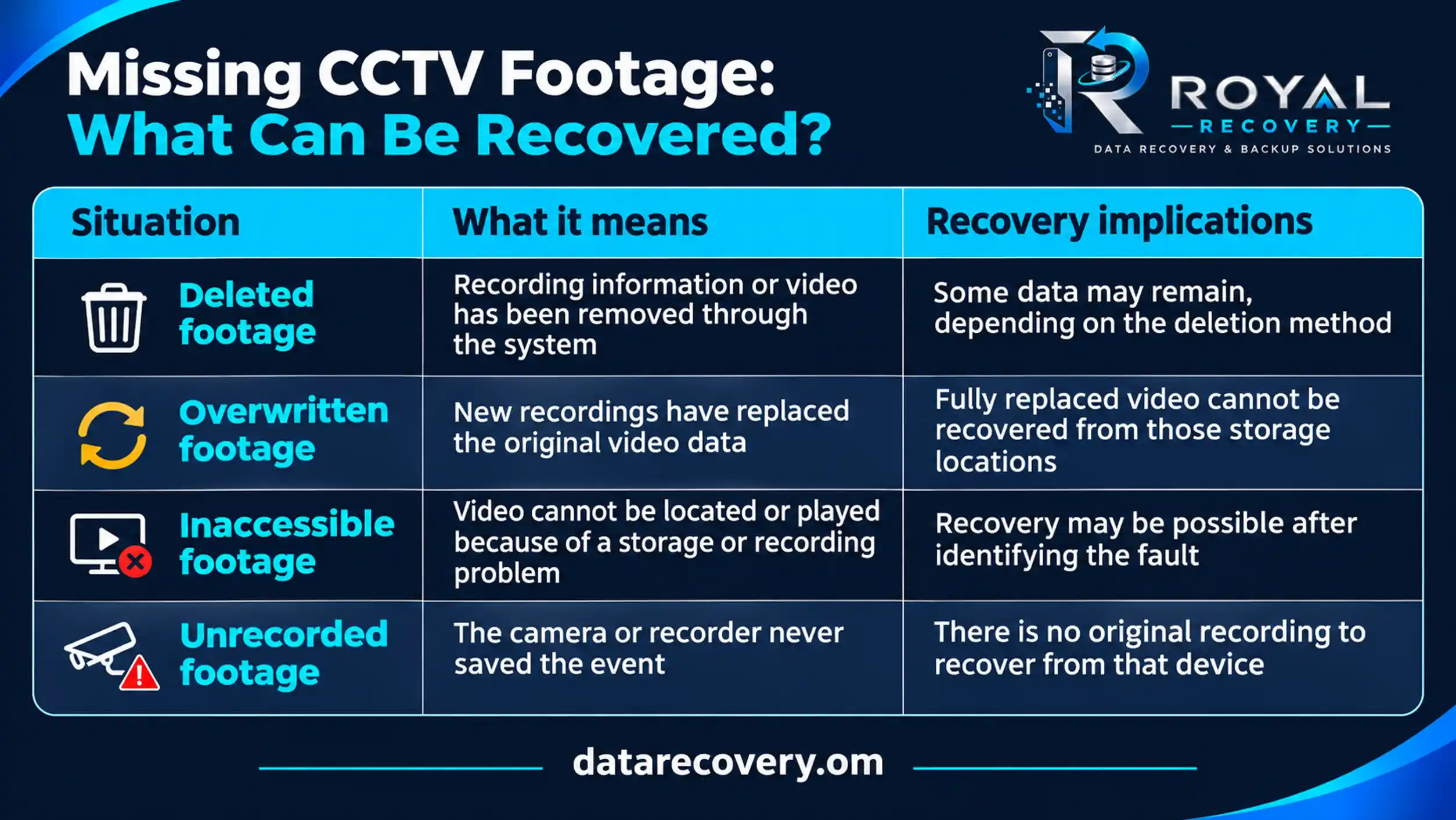
Automatic deletion needs particular care. A retention setting may remove recordings after a defined period, while loop recording replaces older material as storage fills. The exact behaviour depends on the system.
For footage that has been fully overwritten, the practical next step is to look for another copy rather than expect software to reconstruct the replaced recording.
How to Recover Deleted CCTV Footage from a DVR or NVR
A DVR or NVR recovery should begin by checking whether the footage is missing, inaccessible, or simply outside the current playback search.
First, confirm the recording details. Check the camera channel, date range, recording type, and any known clock difference. A search limited to motion events, for example, may exclude other recordings.
Next, check existing copies. An exported clip, another recording server, or a camera memory card may provide the required footage without recovering deleted data.
If the footage is genuinely missing, preserve the original storage. Avoid connecting the drive to a computer and accepting prompts to initialize, format, or repair it.
The recovery method then depends on the device. A specialist may need to create a working image of readable storage and examine the recorder’s video structure. Unstable or physically damaged drives require a different approach before considering a lengthy scan.
Finally, recovered footage needs verification. A file appearing in scan results does not confirm it contains the correct camera, time, or a complete, playable sequence.
Can Deleted CCTV Footage Be Recovered from a Hikvision DVR?
It may be possible, but the Hikvision brand alone does not determine the result. The model, firmware, deletion method, and subsequent recording activity all affect the assessment.
Hikvision documentation describes an overwrite setting that lets a recorder keep saving new files by deleting the oldest files when the hard drive becomes full. This makes continued recording an important part of the incident history.
Before attempting to recover deleted CCTV footage from a Hikvision DVR, record the model number and establish whether:
- The drive was initialized or formatted
- The recorder continued operating
- The required date appears in local playback
- Other cameras or dates remain accessible
- A separate export or backup exists
Footage missing from a phone app should also be checked against the original recording system. An app playback problem does not, by itself, prove that the recorder’s video has been deleted.
Can CCTV Recovery Software Help?
CCTV recovery software can help in some cases where storage is readable and video data remains. Its usefulness depends on compatibility with the recorder’s storage format and the type of loss.
A tool that retrieves ordinary MP4 files from a computer may not correctly reconstruct surveillance recordings. CCTV video may be divided into segments and depend on additional information for camera identification, timing, and playback.
Software also has clear limits. It cannot restore fully overwritten video, repair damaged mechanical components, or recover an event that was never recorded.
For valuable footage, the question is not simply which software to download. It is whether the drive is stable, whether the tool supports the recording structure, and whether the recovery attempt can proceed without changing the original data. Recovered files should always be saved to separate storage.
Can You Recover CCTV Footage from a Formatted or Failed Hard Drive?
A formatted drive and a failed drive need different assessments.
After formatting, recovery depends on what the formatting process changed and whether recording resumed. Some video data may remain, but formatting can also remove information needed to locate and reconstruct it. Formatting the drive again will not restore the footage.
After drive failure, recordings may still exist even though the DVR or NVR cannot access them. The challenge is obtaining readable data without worsening the fault.
A drive that appears intermittently, makes unusual noises, or causes the recorder to freeze should not be treated like a healthy disk with accidentally deleted files. In these cases, professional CCTV data recovery can assess the storage condition before attempting further recovery work.
Can CCTV Footage Be Retrieved from Two Months or One Year Ago?
Possibly, but the age of the recording is not enough to judge recoverability.
Consider two situations. A drive removed from service a year ago may still contain old recordings. A recorder that remained active for two months may already have replaced the required footage through repeated recording cycles.
Retention depends on storage capacity, camera count, video quality, compression, recording schedules, and system settings. There is no universal rule that every CCTV system keeps footage for 30, 60, or 90 days.
For older footage, establish when the event occurred, how long the original storage remained in use, and whether anyone exported a copy. These details are more useful than the calendar age alone.
Where Else to Look: SD Cards, Cloud Storage and Exported Copies
The recorder may not be the only place where the event was saved. Depending on the installation, useful copies may exist on:
- Camera SD cards: Local recordings stored inside individual cameras.
- Cloud accounts: Video retained under the account’s recording plan.
- Export drives: USB devices or external disks used by staff.
- Computers and phones: Downloaded clips or saved recordings.
- Secondary systems: Another recorder, server, or configured backup.
- Incident records: Copies previously shared with an authorized recipient.
Check what each location actually contains. A thumbnail, notification, or screenshot may help identify an event without providing the complete video.
For a business or organization, ask the installer, security team, and IT department about the storage arrangement. Someone may already have saved the required clip.
Preserving CCTV Footage for Workplace Incidents and Investigations
When footage relates to theft, an accident, property damage, or an internal investigation, preserving the original recording and documenting its handling become especially important.
Keep a record of who accessed the system, what actions they took, and when. Retain original exports alongside any converted viewing copies. Note the relevant camera channels and any difference between the recorder’s clock and actual time.
Official CCTV retrieval guidance recommends verifying exported playback, retaining native video where possible, and documenting evidence handling.
If the footage may be needed for a formal investigation, explain that requirement before recovery begins. Discuss the required documentation, delivery format, and handling arrangements with the recovery provider and the person responsible for the investigation.
Recovery alone does not establish how footage will be accepted or interpreted in a particular case.
What Affects CCTV Footage Recovery Costs and Timescales?
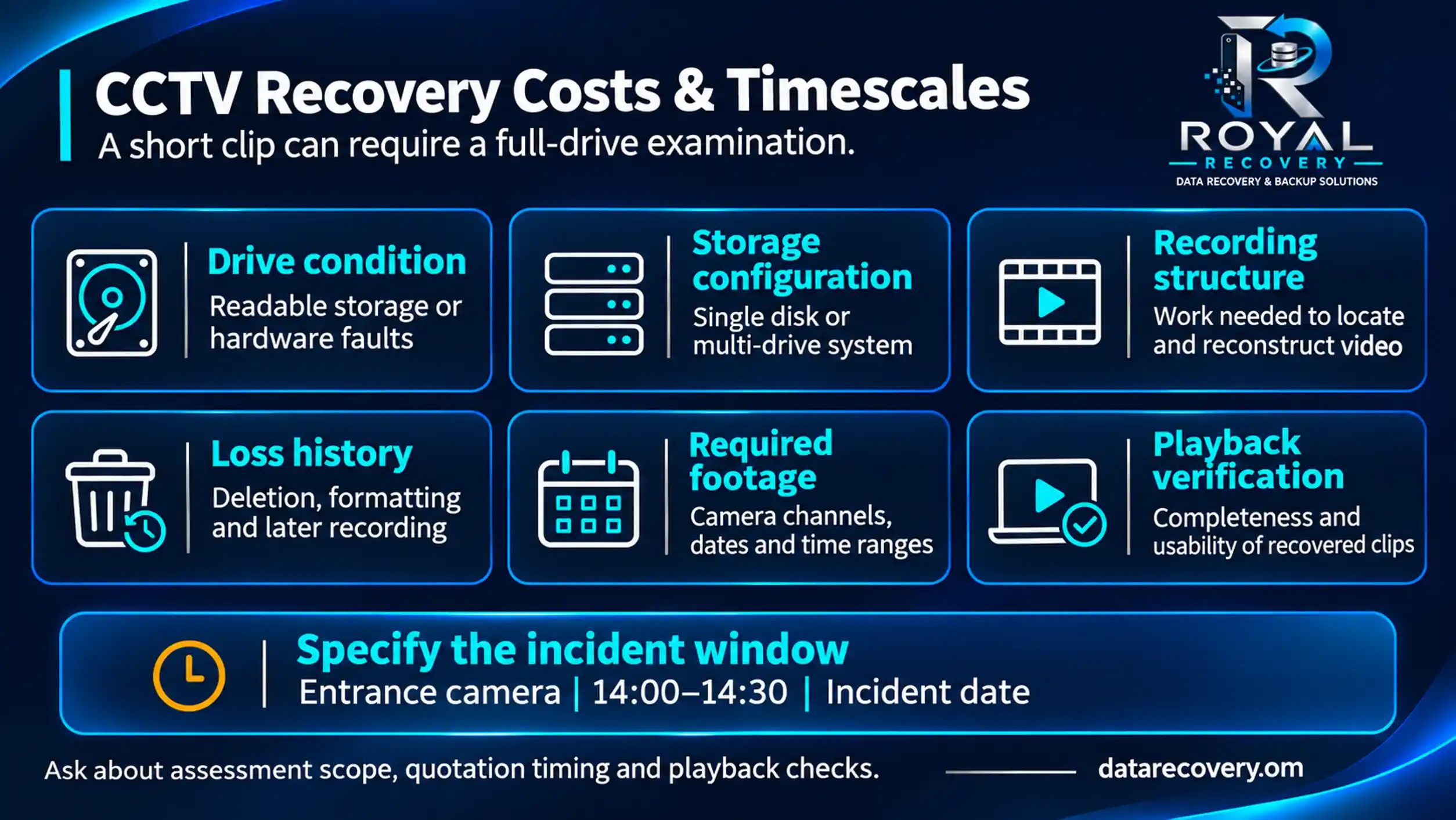
The amount of footage you need does not always reflect the amount of work required. Recovering a ten-minute incident can involve examining a much larger drive to locate the correct camera and time period.
The main cost and time factors include:
- Drive condition: Readable storage or specialist work for hardware faults.
- Storage configuration: A single disk or a multi-drive recording system.
- Recording structure: How complex it is to locate and reconstruct video.
- Loss history: Deletion, formatting, subsequent recording, or earlier attempts.
- Required footage: Camera channels, dates, and time ranges.
- Playback verification: Completeness and usability of recovered clips.
Provide the exact incident window where possible. Requesting one entrance camera between 14:00 and 14:30 gives the assessment a clearer target than requesting “all missing footage.”
Ask what the assessment covers, when a quotation will be available, and how the recovered recordings can be checked.
Request a CCTV Footage Recovery Assessment in Oman
Missing footage can leave a homeowner without a record of an incident or a company without information needed for an important decision. Before attempting further changes, establish what happened to the original recordings and whether recoverable data may remain.
Royal Recovery provides CCTV recovery assessments in Oman for cases involving deleted recordings, formatted storage, and damaged DVR or NVR hard drives. Recovery options are evaluated according to the device condition and loss history.
To discuss your case, prepare the recorder brand and model, required date and time, camera channels, and details of anything done since the footage disappeared. For organizational enquiries, also explain any confidentiality or investigation requirements.
Request a CCTV footage recovery assessment to understand the available next steps before making further changes to the affected storage.
Frequently Asked Questions About Deleted CCTV Footage
Can automatically deleted CCTV footage be recovered?
Sometimes. Recovery depends on how the system removed the recording and whether its video data remains. Footage fully replaced by new recordings cannot be restored from the overwritten locations.
Can deleted CCTV footage be recovered without the DVR?
Potentially, if the original hard drive, camera memory card, backup, or exported copy is available. The original recorder may still be useful for identifying the recording format and checking playback.
Can I recover CCTV footage using my phone?
A phone may let you download recordings that remain available through the camera app. Recovering deleted video from the recorder’s hard drive is a separate process that generally requires access to the storage.
Does “no recording found” mean the footage was deleted?
No. The message can also relate to the selected camera, search filters, clock differences, recording settings, or storage problems. It needs investigation before deletion can be confirmed.
Can a recovery service guarantee the exact clip I need?
No reliable guarantee can be made before assessment. The required footage may be intact, incomplete, overwritten, or absent because the event was never recorded.