A computer that suddenly slows down, repeatedly freezes, loses files, shows disk errors, or won’t start may have a failing hard drive. Clicking or grinding sounds, excessive heat, a burning smell, corrupted files, formatting requests, and a drive that disappears from Windows or BIOS are among the clearest warning signs.
If your hard drive contains important personal or business data, stop using it as soon as you notice these symptoms. Continuing to run a physically damaged drive can turn a recoverable case into permanent data loss.
Royal iRecovery provides professional hard drive diagnosis and data recovery in Muscat for computers, laptops, external drives, HDDs, and SSDs. Contact our team for a free initial examination before attempting to format, repair, or scan the drive.
What Does Hard Drive Failure Mean?
Hard drive failure means a storage device can no longer reliably read, write, or retain data. The failure may be logical, electronic, mechanical, or physical.
- Logical failure: The drive still operates physically, but its partitions, file system, or stored data have become damaged.
- Electronic failure: The circuit board, controller, power component, or connector has been damaged.
- Mechanical failure: Internal HDD components, such as the read/write heads or motor, no longer work correctly.
- Physical failure: The drive has been dropped, exposed to water, overheated, burnt, or otherwise physically damaged.
Signs of a Failing Computer Hard Drive
Hard drives do not always fail with a dramatic final click. Some deteriorate slowly, leaving a trail of small warnings that are easy to ignore.
The Computer Becomes Extremely Slow
A slow computer doesn’t automatically mean its hard drive is failing. Limited memory, background applications, malware, and operating-system problems can cause similar symptoms.
However, the drive may be responsible when:
- Windows takes unusually long to start.
- Folders open slowly.
- Files take several attempts to load.
- Programs freeze while accessing stored data.
- Copying small files takes much longer than usual.
- The computer becomes unresponsive during disk activity.
Files Disappear or Become Corrupted
Documents that no longer open, photos that appear damaged, unexplained file-name changes, and folders that suddenly disappear can indicate file-system corruption or bad sectors.
Occasional corruption may have another cause, but repeated problems affecting unrelated files deserve immediate attention. Don’t keep saving new data to the same drive and hope the issue goes away. Hard drives are not known for emotional recovery.
The Computer Frequently Freezes or Restarts
Frequent freezing can occur when Windows requests data that the drive cannot read correctly. The computer may restart, display a blue-screen error, or become stuck during startup.
Pay particular attention when freezing occurs while:
- Opening a specific folder
- Copying or saving files
- Installing software
- Starting Windows
- Running a disk scan
- Accessing an external hard drive
The Operating System Does Not Start
Messages such as “No bootable device,” “Operating system not found,” or “Disk boot failure” can indicate a damaged drive. They can also result from a loose cable, incorrect BIOS settings, or corrupted boot files.
If the computer stores important data, do not reinstall Windows immediately. Reinstallation can overwrite recoverable data and make professional recovery more difficult.
The Hard Drive Is Not Detected
A drive that doesn’t appear in File Explorer may have a damaged partition rather than a complete hardware failure. Check whether it appears in Disk Management or BIOS.
If the drive is absent from all three locations, possible causes include:
- Loose or damaged connections
- Power-supply problems
- Failed electronic components
- Firmware corruption
- Motor failure
- Severe mechanical damage
Repeatedly reconnecting and powering on a damaged drive is not a diagnosis. It simply gives the damage another chance to spread.
Windows Requests That You Format the Drive
A message saying that the disk must be formatted before use usually means that Windows cannot recognize its file system. Formatting isn’t the right first step when you need the existing files.
Formatting may create new file-system structures and overwrite information needed for recovery. Select Cancel, stop using the drive, and arrange a proper assessment.
You Receive Bad-Sector or Drive-Health Warnings
Bad sectors are areas of a drive that can no longer store or return data reliably. A growing number of bad sectors can cause:
- Slow reading and writing
- Corrupted files
- Failed backups
- Freezing
- Missing folders
- Boot problems
Windows may also display a critical storage warning when it detects reliability problems. Microsoft advises users to check the affected disk under Settings > System > Storage > Advanced storage settings > Disks & volumes and back up important data. support.microsoft.com
The Hard Drive Makes Clicking, Grinding, or Beeping Sounds
An HDD contains moving mechanical components, so some normal operating sound is expected. Repetitive clicking, grinding, scraping, or beeping is different.
These sounds may indicate:
- Damaged read/write heads
- A motor that cannot spin properly
- Internal contact with the platters
- Insufficient power
- Severe mechanical failure
Turn the device off immediately. Do not run recovery software, CHKDSK, or long diagnostic scans on a mechanically damaged drive.
The Drive Overheats or Produces a Burning Smell
A slightly warm drive is normal. If a drive becomes too hot to touch, produces smoke, or smells like burnt plastic or electronics, it may have an electrical failure.
Disconnect power and do not repeatedly test the device. Continuing to power a burnt drive may damage its controller, internal components, or connected computer.
Signs of a Failing Laptop Hard Drive
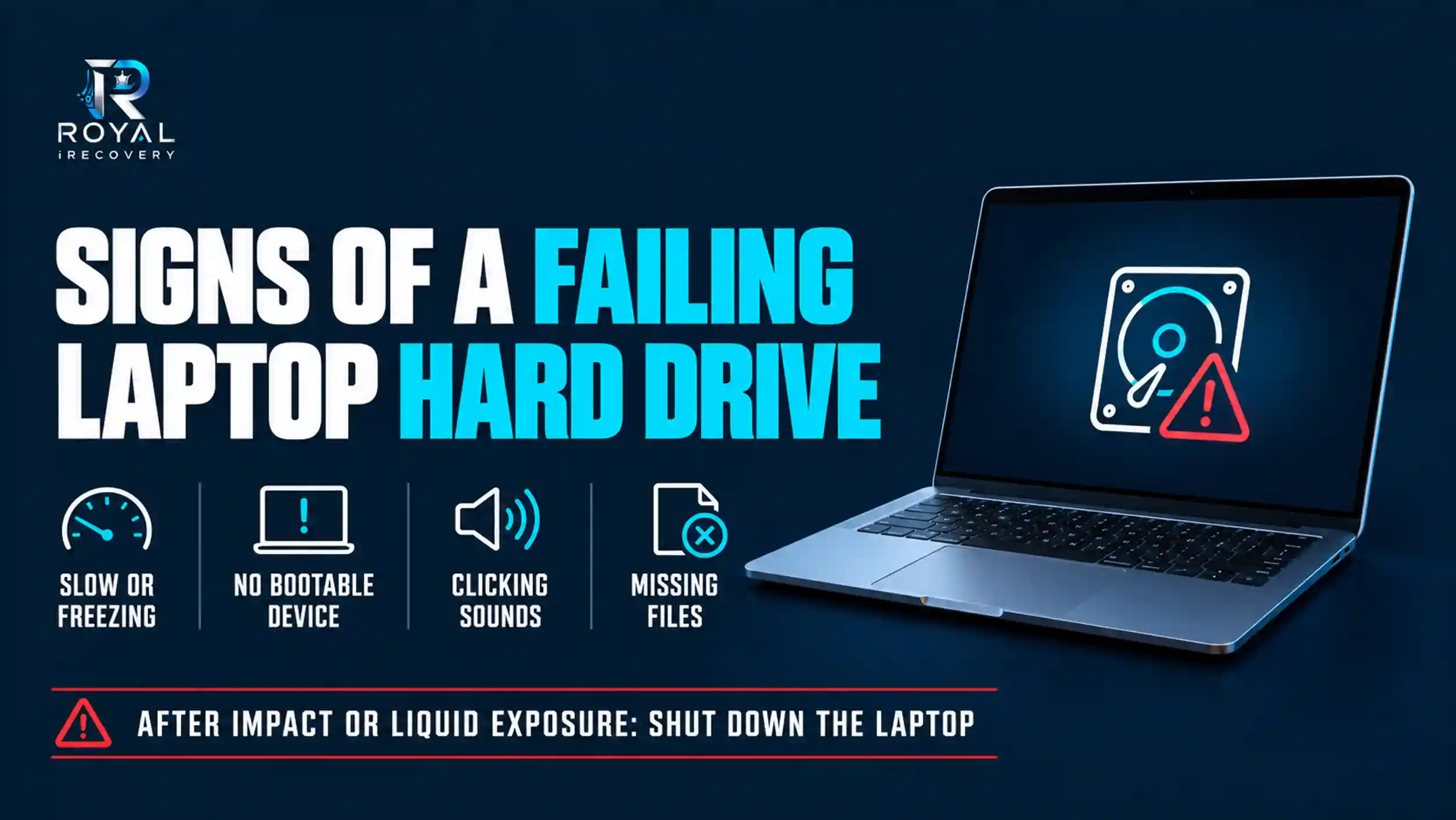
Signs of a failing laptop hard drive are broadly similar to desktop-drive failure, but laptops face additional risks because they are moved frequently and operate in compact enclosures.
Common warning signs include:
- Very slow startup or shutdown
- Frequent freezing during ordinary work
- “No bootable device” errors
- Missing or corrupted files
- Clicking or repetitive mechanical sounds
- Failure after the laptop was dropped
- Problems following liquid exposure
- Excessive heat around the storage area
- A drive that appears and disappears intermittently
If the problem started immediately after impact or liquid exposure, shut down the laptop. Do not keep restarting it to “see if it works now.”
Signs of a Hard Drive Burning Out
The phrase “hard drive burning out” generally refers to electronic or heat-related damage. It doesn’t always mean the entire device has literally caught fire.
Signs of a hard drive burning out include:
- A sharp electrical or burning smell
- Visible smoke
- Burn marks on the circuit board
- Melted power or data connectors
- The drive suddenly stopping
- No vibration or spinning sound from an HDD
- The computer failing to detect the drive
- The computer shutting down when the drive is connected
- Unusual heat developing within seconds
A burnt controller board does not automatically mean the files are gone. The stored information may remain intact on the platters or memory chips. However, replacing a circuit board at home is rarely straightforward because many modern drives contain unique calibration and firmware data.
What Happens If a Computer’s Hard Drive Burns Out?
When a computer hard drive burns out, the operating system may fail to start, and you may lose access to stored files. The drive may no longer spin, communicate with the computer, or appear in BIOS.
Several outcomes are possible:
- Only an external connector or protective component is damaged.
- The printed circuit board has failed.
- The motor or internal electronics have been affected.
- Heat has damaged multiple components.
- The platters or memory chips remain intact, and you can still recover the data.
- Severe heat has physically damaged the storage media.
Do not connect the drive to another computer if you see visible burn damage or smell a strong electrical odor. A short circuit can also damage the second device.
What Causes a Computer Hard Drive to Fail?
Hard drives can fail because of age, physical damage, electrical problems, environmental conditions, or manufacturing defects.
Age and Mechanical Wear
HDDs contain moving parts operating at high speed. Bearings, motors, and read/write components wear over time. A drive can continue working for years, but age increases uncertainty rather than providing a precise expiration date.
Overheating
Poor airflow, blocked ventilation, dust, direct sunlight, and high ambient temperatures can place additional stress on storage devices.
This deserves particular attention in Oman. Keep computers, external drives, servers, and surveillance systems in ventilated, temperature-controlled environments, not in hot cars, closed cabinets, or spaces exposed to direct sunlight.
Power Surges and Electrical Damage
Sudden voltage changes, incompatible power adapters, faulty power supplies, and incorrect connections can damage a hard drive’s electronics.
Surge protection and an uninterruptible power supply can reduce risk, particularly for business computers, servers, NAS devices, and CCTV storage systems.
Physical Shock
Dropping a laptop or external drive can damage internal HDD components. The risk is especially high when the drive is powered on because its read/write heads operate extremely close to the platter surfaces.
Water and Liquid Damage
Water, coffee, soft drinks, humidity, and cleaning liquids can cause corrosion or short circuits. Do not power on a wet drive to check whether it survived.
Bad Sectors and Media Degradation
A small number of reallocated sectors may not cause immediate failure, but a rapidly increasing number can signal deterioration. Files stored in damaged areas may become slow, corrupted, or inaccessible.
File-System Corruption
Improper shutdowns, software errors, malware, failed updates, or disconnecting an external drive during a write operation can damage the file system. The drive may remain physically healthy even though Windows cannot access its contents.
How to Check If a Hard Drive Is Failing in Windows
Windows includes several ways to check whether a storage device is visible and reporting health problems. These checks are appropriate only when the drive is stable, silent, and not physically damaged.
If it clicks, grinds, overheats, disconnects repeatedly, or smells burnt, stop and request a professional diagnosis.
How to Check a Hard Drive in Windows 10
- Right-click the Start button.
- Open Disk Management.
- Find the affected drive.
- Check whether its partitions appear correctly.
- Look for statuses such as Unknown, Not Initialized, Unallocated, or Offline.
Do not initialize, format, or create a new volume if you need the existing data.
You can also:
- Open File Explorer.
- Right-click the drive.
- Select Properties.
- Open the Tools tab.
- Choose Check under Error Checking.
This process checks the file system; it does not prove the drive’s mechanical condition is healthy.
How to Check a Hard Drive in Windows 11
In Windows 11:
- Open Settings.
- Select System.
- Open Storage.
- Select Advanced storage settings.
- Open Disks & volumes.
- Select the relevant drive and review its properties.
You can also open PowerShell as an administrator and run:
Get-PhysicalDisk
The command can report physical disks as Healthy, Warning, Unhealthy, or Unknown. learn.microsoft.com
A “Healthy” result is useful but not absolute proof that every file and mechanical component is safe. No single test catches every failure.
Checking SMART Health with CrystalDiskInfo
CrystalDiskInfo is commonly used to read SMART information reported by HDDs and SSDs. It may display:
- Drive temperature
- Reallocated sectors
- Pending sectors
- Uncorrectable errors
- Power-on hours
- Overall caution or warning status
The program can help identify a developing problem, but it cannot repair physical damage. A good SMART status also does not guarantee that a drive will not fail suddenly.
Should You Run CHKDSK?
CHKDSK can identify and repair certain file-system errors, but it is not a general data-recovery tool. On an unstable drive, intensive checking can increase stress and alter file-system information.
Do not run CHKDSK before recovery when:
- The drive makes abnormal sounds.
- It repeatedly disconnects.
- It contains irreplaceable data.
- It has suffered impact, heat, or water damage.
- Windows requests formatting.
- Previous scans have already failed.
How to Test a Hard Drive Without a Computer
A meaningful hard drive test requires compatible hardware. Without a computer, dedicated diagnostic station, NAS, or other controller, you can only perform a limited physical inspection.
You may check for:
- Burn marks
- Melted connectors
- Liquid residue
- Corrosion
- A burnt smell
- Obvious impact damage
A compatible SATA-to-USB adapter or external enclosure can connect some drives to another computer, but this is unsuitable for a clicking, burnt, wet, or seriously damaged drive.
Do not open an HDD outside a professional clean environment. Dust particles that look harmless to the human eye can contaminate platter surfaces.
Common Hard Drive Problems and Safe Responses
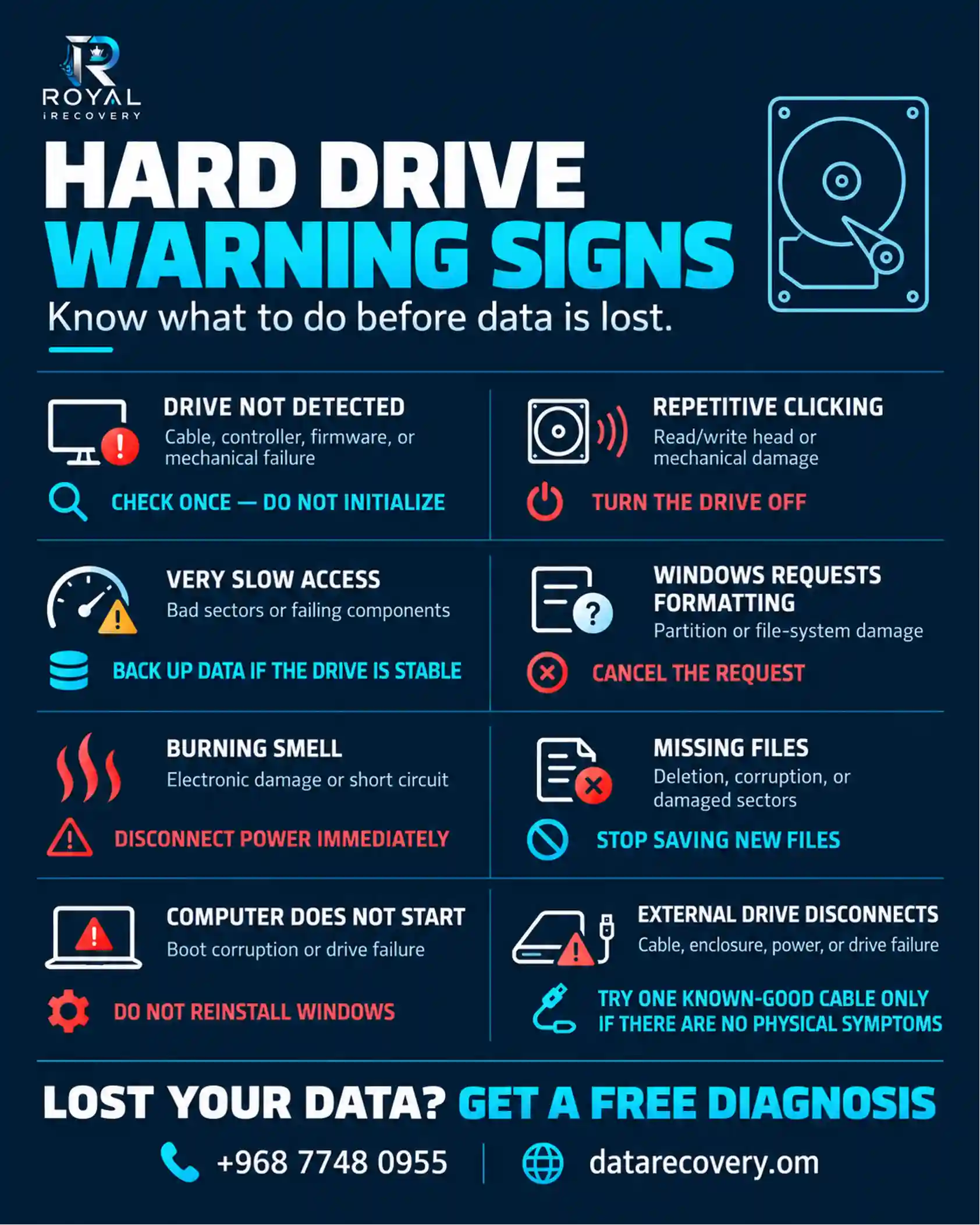
Some common hard drive problems can be caught early, so it helps to know the signs and act quickly. We recommend calling us when you see the first sign and addressing it early.
How Do I Know If My External Hard Drive Is Failing?
An external hard drive may be failing if it:
- Disconnects during file transfers
- Appears and disappears from Windows
- Becomes unusually slow
- Requests formatting
- Prevents the computer from starting
- Makes clicking, grinding, or beeping sounds
- Becomes excessively hot
- Displays incorrect storage capacity
- Opens some folders but freezes on others
- Works through one connection and then stops again
The enclosure, cable, or power adapter may also be responsible. However, do not remove a drive from its enclosure or repeatedly test it if there are signs of mechanical or electrical damage.
Can a Failed Hard Drive Be Fixed?
Sometimes—but “fixed” can mean two different things.
A logical problem may be corrected, making the drive accessible again. A damaged connection or external enclosure may also be replaced. In a professional recovery lab, technicians may temporarily stabilize a failed HDD to extract its data.
That does not mean the drive should return to daily use.
Generally, replace a mechanically or electronically failed drive after you recover the data. Professional intervention aims to save the information, not to give unreliable hardware a second career.
Is Your Hard Drive Failing? Get Professional Help
If your hard drive is slow, inaccessible, or showing signs of mechanical or electronic failure, professional diagnosis can help determine the safest solution. Avoid unnecessary repairs or repeated testing, especially if your drive contains important files.
Explore our [Professional Hard Drive Repair Services] to identify the problem and find the right solution for your device.
Contact Royal iRecovery for a free initial diagnosis in Muscat.
Can Data Be Recovered from a Failed or Burnt Hard Drive?
Data recovery may be possible when the original storage media remains readable. The correct method depends on the type of failure.
Logical Failure
Specialized tools may recover files from deleted partitions, corrupted file systems, accidental formatting, or inaccessible volumes.
Electronic Failure
A specialist may need to diagnose the controller board, repair electronic components, or transfer drive-specific firmware information.
Mechanical Failure
Mechanical HDD failure may require controlled work in a dedicated cleanroom, compatible donor components, and specialized imaging equipment.
Burn Damage
Recovery depends on how far the heat or electrical damage traveled. Damage limited to external electronics may offer a better outlook than severe damage to the platters or SSD memory chips.
No responsible data-recovery company can guarantee the outcome before examining the actual drive.
What Is the Lifespan of a Hard Drive?
No hard drive has a universal lifespan. Consumer HDDs often last several years, but some fail much earlier, while others remain operational much longer.
Useful life depends on:
- Drive model and manufacturing quality
- Daily workload
- Operating temperature
- Power quality
- Physical handling
- Vibration
- Humidity
- Ventilation
- Frequency of startup and shutdown
- Whether the drive operates in a laptop, desktop, server, NAS, or CCTV recorder
Treat age as a risk factor, not a countdown clock. A three-month-old drive can fail, while an older one may appear healthy. This is why important data must never exist on only one device.
How Common Is Hard Drive Failure?
Hard drive failure is common enough that individuals and businesses should expect it eventually, but no honest universal failure rate applies to every drive.
As an example, Backblaze reported a 1.36% annualized failure rate across more than 344,000 qualifying data drives in its 2025 fleet. This is useful large-scale evidence, but it describes data-center drives operating under Backblaze’s conditions—not every personal computer or laptop.
Failure rates vary significantly by model, age, capacity, workload, and environment. The sensible conclusion is simple: storage devices are replaceable; lost family photos, company databases, and years of work often are not.
Is It Worth Repairing a Hard Drive?
Repairing or temporarily stabilizing a failed drive can be worthwhile when the stored data is more valuable than the hardware.
Professional intervention may make sense when the drive contains:
- Business records
- Accounting files
- Customer information
- Research or academic work
- Family photos and videos
- Creative projects
- Databases
- Legal documents
- Files without a current backup
Repair is usually not worthwhile when all the files exist in a verified backup, and the objective is simply to reuse the old drive. In that situation, replacement is generally safer and more economical.
The question is not “How much is this hard drive worth?” A failed drive may be worth very little. The real question is “How much is the data inside it worth?”
Professional Hard Drive Diagnosis and Data Recovery in Muscat
Royal iRecovery provides professional data-recovery services for damaged, formatted, inaccessible, and failed storage devices in Muscat and across the Sultanate of Oman.
Our services cover:
- Computer hard drive data recovery
- Laptop data recovery
- External hard drive recovery
- HDD and SSD data recovery
- Deleted file recovery
- Formatted drive recovery
- Electronic and mechanical failure
- Business and enterprise data recovery
With more than 25 years of professional experience, Royal iRecovery uses specialized equipment such as PC-3000 and maintains dedicated cleanroom facilities for sensitive procedures. The Oman division also offers an initial diagnosis, confidential data handling, and a no-recovery, no-fee policy.
How Our Data-Recovery Process Works
1. Contact Our Team
Call or message us and describe what happened, including any unusual sounds, errors, impact, liquid exposure, heat, or previous recovery attempts.
2. Drive Intake and Diagnosis
Our specialists examine the storage device and identify the likely type of failure.
3. Recovery Assessment
After diagnosis, we explain the possible recovery method, estimated timeframe, and expected cost.
4. Data Recovery
Once you approve the plan, we begin the appropriate recovery procedure.
5. Secure Data Delivery
We deliver recovered files through the agreed method while maintaining confidentiality.
Visit Royal iRecovery in Al Khuwair, Muscat
Our Oman data-recovery center serves individuals, companies, banks, government entities, IT professionals, photographers, and other organizations in Muscat and throughout Oman.
Address: Al Khuwair Street, Al-UZD Complex, Shop No. 5, Sultanate of Oman
Phone and WhatsApp: +968 77 480 955
Email: info@datarecovery.om
Frequently Asked Questions
Can a failed hard drive be fixed?
Some logical, connection, firmware, or electronic problems may be repairable. A mechanically damaged drive may sometimes be temporarily stabilized for data recovery, but you should not trust it for continued storage.
What is the lifespan of a hard drive?
Many hard drives operate for several years, but no one can guarantee a lifespan. Temperature, workload, power quality, handling, and manufacturing quality all affect reliability.
How common is hard drive failure?
Failure rates vary widely by model and operating environment. Hard drive failure is common enough that every important file should have at least one separate backup.
Is it worth repairing a hard drive?
It may be worth it if the drive contains valuable or irreplaceable data. If the data is already safely backed up, replacing the failed drive is usually more practical.
How can we tell if a computer hard drive has failed in Windows?
Check whether the drive appears in BIOS, Disk Management, and Windows storage settings. Warning signs include corrupted files, extreme slowness, health alerts, formatting prompts, unusual sounds, or a drive that disappears.
How do I check whether a hard drive is failing in Windows 10 or 11?
Review the drive in Disk Management, check its properties under Windows storage settings, and examine SMART information. Don’t run intensive tests when the drive shows physical failure symptoms.
Can CrystalDiskInfo detect a failing hard drive?
CrystalDiskInfo can display SMART values and warnings reported by the device. It can help identify some problems, but it cannot detect every failure or repair physical damage.
Can I recover data from a clicking hard drive?
Recovery may be possible, but power off the drive immediately. Continued use can allow damaged internal components to harm the platter surfaces.
Can you recover data from a burnt hard drive?
It may be possible if the platters or memory chips remain readable. The outcome depends on where the electronic or heat damage occurred and how severe it is.
Where can I diagnose a failed hard drive in Muscat?
Royal iRecovery provides professional hard drive diagnosis and data recovery at Al Khuwair Street, Al-UZD Complex, Shop No. 5, in Muscat.