
A slow laptop is not always an old laptop. Too many background programs, insufficient RAM, limited storage, overheating, malware, outdated software, or a failing HDD or SSD can all slow it down. The right solution depends on whether the problem comes from software, hardware, or both.
If your laptop suddenly becomes slow, freezes repeatedly, overheats, makes unusual sounds, or cannot open important files, contact Royal iRecovery in Muscat for a free initial diagnosis. We inspect the device before recommending repair, cleaning, an SSD or RAM upgrade, or data recovery.
Why Do Laptops Slow Down So Much?
A laptop gradually collects programs, temporary files, updates, browser extensions, and background services. At the same time, newer applications demand more memory and processing power. Eventually, the laptop may struggle to handle tasks it once completed easily.
The most common reasons for a laptop slowing down include:
- Too many programs running simultaneously
- Unnecessary startup applications
- Insufficient RAM
- A nearly full storage drive
- An old mechanical hard drive
- HDD or SSD failure
- Overheating
- Dust inside the cooling system
- Malware
- Outdated drivers or Windows files
- Battery and power-mode restrictions
- Hardware that no longer meets software requirements
Finding the real cause matters. Reinstalling Windows won’t fix a damaged fan, and adding RAM will not save a failing hard drive.
The Most Common Reasons for a Laptop Slowing Down
Too Many Programs Running in the Background
Programs can keep consuming memory, CPU, and battery power even when you are not actively using them. Common examples include cloud synchronization, antivirus scans, communication apps, and update services.
Open Task Manager and check which applications are using the most CPU, memory, and disk resources. Do not randomly end unfamiliar Windows processes; some are required for the operating system to function correctly.
Too Many Startup Applications
Applications configured to start with Windows can make login painfully slow. They may also continue running throughout the day.
In Task Manager, open Startup apps and disable programs that do not need to launch automatically. Keep security software and essential hardware utilities enabled.
Insufficient RAM
RAM temporarily holds the information active applications need. When available memory runs low, Windows uses the storage drive as temporary memory. This is considerably slower, especially when the laptop still uses an HDD.
Signs of insufficient RAM include:
- Freezing when switching between programs
- Slow performance with several browser tabs
- Delayed response when opening large files
- High memory usage in Task Manager
Adding RAM can improve performance when the laptop supports an upgrade. However, the correct type and capacity must match the device.
A Full Storage Drive
Windows needs free space for temporary files, updates, virtual memory, and normal system operations. Performance can decline when the main drive is nearly full.
Remove unused applications, delete unnecessary downloads, and transfer large files to secure storage. Do not delete unfamiliar system folders merely because they look large.
An Old Mechanical Hard Drive
A traditional HDD is considerably slower than a modern SSD. A laptop may start slowly, take longer to open programs, and struggle to transfer files, even when the HDD is technically healthy.
Replacing an HDD with an SSD is often one of the most noticeable upgrades available for an older laptop. You must carefully migrate the operating system and files, especially if the original drive has errors.
A Failing HDD or SSD
A laptop can become extremely slow when its storage device repeatedly struggles to read data. This is more serious than a typical performance slowdown.
Possible warning signs include:
- Corrupted or missing files
- Freezing while opening folders
- Clicking or grinding sounds
- Repeated formatting requests
- “No bootable device” errors
- The drive appearing and disappearing
- Windows taking several attempts to start
If you store important files on the device, stop using it. Repeated scans, restarts, or software-based repair attempts can make some recovery cases more difficult.
Laptop Overheating
Processors slow down when temperatures get too high. This protective response, known as thermal throttling, prevents immediate damage but slows the laptop.
Overheating may be caused by:
- Dust blocking the air vents
- A damaged or weak cooling fan
- Dried thermal paste
- Using the laptop on a bed or soft surface
- Heavy applications
- High ambient temperatures
Heat deserves particular attention in Oman. Do not leave a laptop in a hot vehicle, expose it to direct sunlight, or operate it with blocked ventilation.
Malware or Unwanted Software
Malware may use system resources, display unwanted advertisements, alter browser settings, or run hidden processes. If performance suddenly declines after you download a program or open an attachment, run a full security scan.
Outdated Windows or Drivers
Old, damaged, or incompatible drivers can create performance problems. Failed Windows updates may also cause high processor or disk usage.
Get updates from Windows Update or the laptop manufacturer. Driver-download websites of unknown origin often fix one problem while creating three new ones.
Power and Battery Settings
Windows may limit performance to save battery power. A worn battery or unsuitable adapter can also affect some laptops.
Connect the correct charger and check the Windows power mode. Selecting a higher-performance setting may help, but it will increase heat and battery consumption.
Why Is My Laptop Suddenly So Slow?
Sudden slowness usually points to a recent change rather than gradual aging. Possible causes include:
- A Windows or driver update
- A newly installed program
- Malware
- A failing HDD or SSD
- A cooling-fan problem
- Insufficient storage space
- A damaged battery or charger
- Failing RAM or motherboard components
If the laptop worked normally yesterday but now freezes, overheats, restarts, or cannot access files, don’t immediately reinstall Windows. First determine whether the storage device and other hardware are healthy.
How Do I Figure Out What Is Slowing Down My Laptop?
Start with the symptom rather than guessing at the solution.
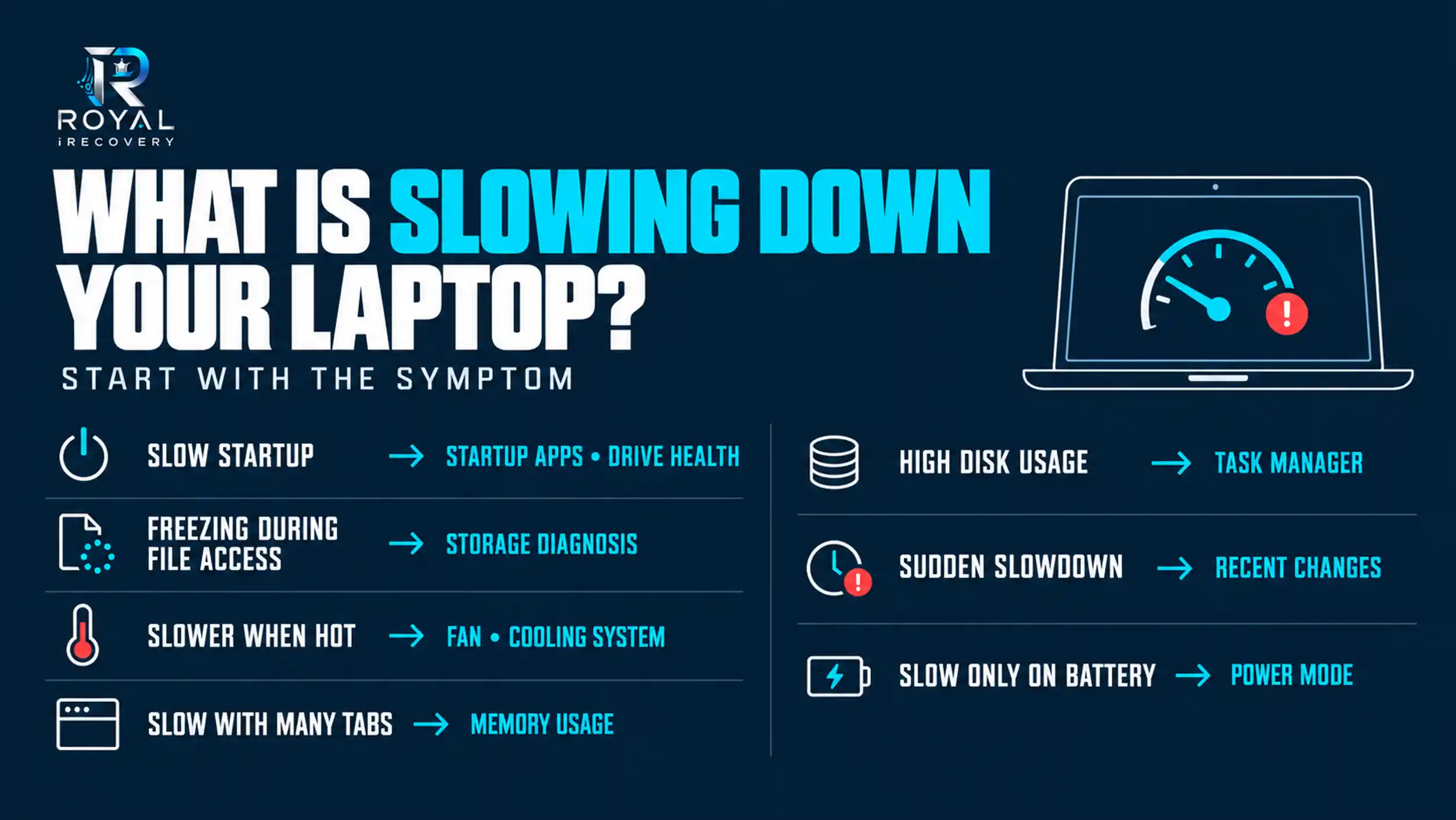
Open Task Manager by pressing Ctrl + Shift + Esc. Review CPU, Memory, Disk, and Network usage. A temporary spike is normal. Constantly high usage requires investigation.
Also check:
- Available space on the Windows drive
- Recently installed applications
- Startup programs
- Windows and driver updates
- Laptop temperature and fan operation
- HDD or SSD health
- Performance while connected to the correct charger
Reasons for a Laptop Slowing Down in Windows 11
Windows 11 may feel slow when the laptop has limited RAM, an older processor, insufficient free storage, or a mechanical HDD. Visual effects, background applications, updates, and power settings can increase the load.
To investigate:
- Review Task Manager.
- Disable unnecessary startup applications.
- Check Settings > System > Storage.
- Install appropriate Windows and driver updates.
- Review the power mode.
- Scan for malware.
- Check storage health if disk usage remains high.
Reasons for a Laptop Slowing Down in Windows 10
The same fundamental issues affect Windows 10: excessive startup programs, insufficient RAM, limited storage, malware, outdated drivers, overheating, and old HDDs.
Because many Windows 10 laptops are now several years old, dust buildup, worn batteries, mechanical drives, and limited memory are especially common. A professional inspection can determine whether cleaning, an SSD upgrade, additional RAM, or repair is the sensible option.
My Laptop Is Very Slow and Keeps Hanging
A slow laptop that keeps hanging may have a software problem, but repeated freezing can also indicate hardware failure.
Notice when the problem occurs:
- While starting Windows: Check startup software and storage health.
- While opening files: Inspect the HDD or SSD.
- During heavy use: Check temperature, RAM, and cooling.
- When moving the screen or charger: Inspect connections and power components.
- At random: Test RAM, storage, drivers, and motherboard components.
If the laptop clicks, gets excessively hot, shuts down unexpectedly, or won’t let you access important files, stop using it and seek professional diagnosis.
Why Is My HP Laptop So Slow?
An HP laptop can slow down for the same reasons as Dell, Lenovo, ASUS, Acer, MSI, Fujitsu, Apple, and other laptops. Common causes include limited RAM, an old HDD, excessive startup utilities, overheating, battery-related power limits, and outdated drivers.
Avoid downloading random “speed booster” programs. Instead, check system usage, storage health, cooling performance, and upgrade compatibility.
Royal iRecovery diagnoses and repairs HP and other major laptop brands at its Muscat center.
How Do I Fix My Laptop’s Slowness?
Work from the safest and simplest solutions toward hardware repair:
- Restart the laptop.
- Close unused programs and browser tabs.
- Disable unnecessary startup applications.
- Free up storage space.
- Scan for malware.
- Install suitable Windows and driver updates.
- Check power settings.
- Inspect temperature and fan operation.
- Test the HDD or SSD.
- Consider an SSD or RAM upgrade.
- Request professional diagnosis if the problem continues.
Do not format the drive, reinstall Windows, or run aggressive disk-repair tools when files are disappearing or the drive makes abnormal sounds.
Laptop Still Running Slow After Troubleshooting?
If your laptop continues to freeze, overheat, or run slowly after trying these solutions, the problem may require professional attention. Our [Laptop Repair Services in Muscat] can help identify hardware faults, cooling issues, and other performance problems.
Contact Royal iRecovery for a free initial diagnosis.
How Can I Make a Very Slow Laptop Faster?
The most effective solution depends on the bottleneck:
- High memory usage: Upgrade the RAM.
- Slow mechanical drive: Install an SSD.
- High temperature: Clean and repair the cooling system.
- Full storage: Remove or transfer unnecessary files.
- Software conflicts: Repair Windows and remove problematic programs.
- Failing storage: Prioritize data recovery and replace the drive.
- Outdated hardware: Compare upgrade costs with the cost of a laptop replacement.
An SSD can’t fix a damaged motherboard, and more RAM cannot cool an overheating processor. Diagnosis comes first; upgrades come second.
Should You Upgrade, Repair, or Replace a Slow Laptop?
Consider an upgrade when the laptop is generally healthy and supports additional RAM or an SSD. Repair may be worthwhile when you can fix cooling, charging, storage, software, or motherboard problems economically.
Replacement may make more sense when several expensive components have failed, or the hardware no longer supports the software you need.
The laptop’s age matters, but its actual condition matters more.
When Does a Slow Laptop Need Professional Diagnosis?
Arrange a professional inspection when:
- The laptop suddenly becomes extremely slow.
- It freezes or restarts repeatedly.
- The fan makes abnormal sounds.
- The laptop overheats or shuts down.
- The HDD clicks or grinds.
- Windows cannot detect the storage drive.
- Important files become inaccessible.
- The laptop remains slow after basic troubleshooting.
These symptoms can indicate storage, cooling, RAM, power, or motherboard failure.
Professional Slow Laptop Diagnosis and Repair in Muscat
Royal iRecovery provides professional laptop diagnosis and repair in Muscat for hardware, software, and performance problems.
Our services include:
- Laptop performance diagnosis
- Software installation and troubleshooting
- RAM and SSD upgrades
- HDD and SSD inspection
- Laptop cleaning and cooling-system maintenance
- Motherboard repair
- Battery replacement
- Charger and charging-port repair
- Screen, keyboard, hinge, and chassis repair
- Data recovery from damaged laptops and storage devices
Our team has more than 25 years of technical experience and provides a free initial diagnosis. Customers can deliver their devices to our Muscat center, while laptops from other regions of the Sultanate of Oman can also be sent for service.
Repair Your Slow Laptop Before a Minor Problem Becomes a Major Failure
A slow laptop may just need a software cleanup, but it may also be warning you about overheating or storage failure. Ignoring the cause may eventually leave you with a laptop that won’t start, or files that won’t open.
Contact Royal iRecovery in Muscat for a free initial diagnosis. We will inspect the laptop, identify the cause of the slowdown, and recommend the appropriate repair, cleaning, upgrade, or data-recovery solution.
Frequently Asked Questions
Why do laptops slow down?
Laptops slow down because of background programs, limited RAM, full storage, aging hardware, overheating, malware, or storage failure.
Will adding RAM make my laptop faster?
Additional RAM can improve performance when memory usage is high. It won’t fix overheating, storage failure, or processor limitations.
Will replacing an HDD with an SSD speed up my laptop?
Yes. Replacing a healthy HDD with an SSD can significantly improve startup, loading, and file-access speeds.
Why does my laptop keep freezing?
Repeated freezing may be caused by insufficient RAM, overheating, damaged software, driver problems, or a failing HDD or SSD.
Where can I diagnose a slow laptop in Muscat?
Royal iRecovery provides free initial laptop diagnosis and professional repair services at its Muscat center.